CoilPath: Hands-on control-circuit simulator for students and technicians
CoilPath: Control Circuits lets users draw IEC-standard schematics, run live simulations that show current paths and motor rotation, and switch to device wiring views for practical assembly. Developed by Mühendisiz Hepimiz for the education-reference category, the app bundles a component library, PLC and HMI simulation modules, and an indexed task system. It targets electrical engineering students, vocational trainees, and apprentice electricians who need guided, practice-based exposure to industrial control wiring and troubleshooting.
What CoilPath does and how it represents circuits
CoilPath renders control logic using IEC symbols and a dual-view display, so users can view a schematic or a realistic device-wiring perspective. The app’s interactive simulator visualizes current paths and motor rotation in real time, and its component list includes contactors, relays, timers, sensors, and breakers. Those capabilities let a learner observe both logical signal flow and the physical screw-terminal wiring that connects industrial control hardware.
How the app teaches through practice and staged challenges
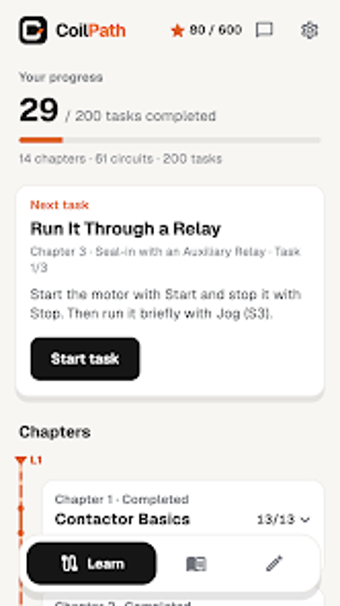
CoilPath uses a progression of 200 tasks across 14 chapters to teach wiring and troubleshooting by doing. Tasks move from basic wiring to advanced fault-finding scenarios, which the simulator supports by animating current and device states during a run. The inclusion of ready-made circuits for PLC, VFD, HMI, and Solar PV gives learners concrete examples to dissect and modify while completing chapter challenges.
Who it suits and accessibility across skill levels
The app is aimed at electrical engineering students, vocational school learners, apprentices, and field technicians who work with industrial panels. Language support includes English, Turkish, German, French, Italian, Spanish, and Brazilian Portuguese, and the app works offline for drawing and simulating circuits. These details make it appropriate for classroom use, lab practice, and hands-on study where internet access may be intermittent.
Progress tracking, project storage, and content customization
Projects save locally by default, and signing in with a Google or Apple account enables cloud sync across devices. CoilPath provides a library of 62 ready-made circuits and PLC/HMI modules that learners can modify, and the simulator lets users test ladder logic and operator panels. The app does not lock basic drawing and simulation behind an account, since offline editing is explicitly supported without signing in.
A focused training tool that requires an upgrade for full content access
CoilPath is a practical training resource for vocational students and technicians who need hands-on circuit assembly and troubleshooting practice; the interactive simulator and task-driven chapters make it suitable for guided study. Note that access to the full task set and the complete circuit library requires upgrading to CoilPath Pro. For learners seeking applied, device-level practice with IEC schematics, CoilPath supports that workflow effectively.